


Local Weather: Forecast&Alerts
4.419.00 Reviews
App Specs
- Version
- 1.11.0
- Updated On
- License
- Free
- Downloads
- 100,000+
- Developer
- Muheb Bangash
- Categories
- Weather
- Platform
- Android
Screenshots
 Analysis by AppCompare
I usually open a weather app for one practical reason: I need to decide what to do next. Should I take a jacket, change my route, or move an outdoor plan indoors? Local Weather: Forecast&Alerts is built around that everyday local check, with forecasts and alerts intended to help make those choices easier. Its appeal is straightforward rather than technical, though a useful forecast still depends on checking the right place and treating changing conditions with sensible caution.
Start with the right place and expectations
Weather apps can feel wrong before the forecast itself is even the issue. A manually selected town may not match the area where you are, and a location setting that has not refreshed can leave you looking at yesterday’s context for today’s plans. When opening Local Weather, I would first check that the displayed location is the one I actually care about. If I am planning a trip across town or travelling, I would verify the destination rather than assume a local view automatically follows me.
It also helps to decide what question you are asking. “Will it rain during my walk?” is different from “What will the weather be like this week?” A current reading can help with what to wear right now, while a longer-range forecast is better treated as a planning guide, not a promise. I find that keeping those purposes separate prevents a common frustration: expecting a broad forecast to settle the exact timing of a short outdoor errand.
A simple setup check before relying on alerts
The app offers a choice between selecting a location manually and letting it use your location automatically. I would choose the method that fits my routine, then check that the result makes sense before depending on notifications. If I prefer not to have my phone determine where I am, manual selection is a practical alternative; if I move around frequently, automatic location can save repeated adjustments. Either way, it is worth checking the selected place after a change in routine or travel.
Units matter more than they seem. If a temperature looks unexpectedly warm or cold, I would check whether the app is set to Celsius or Fahrenheit before changing clothing plans. That quick check is especially useful when sharing the forecast with someone who uses a different scale. A theme change can make the screen more comfortable to look at, but it should not be confused with a change in the forecast itself.
Notifications are only useful if they fit how you use your phone. If severe-weather alerts are important to your routine, take a moment to make sure you can notice them among your other notifications. If an alert seems missing, I would check the chosen location and the phone’s notification settings before assuming the forecast did not include a warning. The practical lesson is to treat the app as one part of a sensible plan, not as a substitute for paying attention to conditions around you.
Make the forecast answer a real decision
For a normal workday, I would use the current conditions and the day’s forecast together: check before leaving, then look again if plans depend on being outside later. Humidity, wind speed, and UV information can add useful context beyond a simple temperature. A mild reading can still feel uncomfortable in humid weather, while wind can make a short wait outdoors feel colder. UV information is a reminder to think about sun exposure, rather than just whether the sky looks clear.
Worth Reading Before You Choose

Baby Panda World Brings Quick Play to Modern Phones, but Its Game Library Feels Busy

ESPN’s Live Game View Makes Following Close Games Easier

QuizzLand Review: A Good Fit for Short Trivia Breaks, Not Every Player

Basketball Stars: Multiplayer Is Fast, but Can It Recover When Matches Go Wrong?

WEBTOON Turns Phone Updates Into a Better Reading Routine

Link to Windows Runs on Shared Habits, Not Social Feeds
For a weekend plan, the week view is helpful as an early heads-up, but I would revisit it closer to the day before making a decision that is hard to reverse. If I am organising a picnic, for instance, I can use the forecast to choose a likely day, then check again before buying food or inviting people to travel. That two-step approach is more reliable than treating an early outlook as fixed, and it makes the app useful without asking it to predict every local change perfectly.
When a result seems stale or out of place
If conditions on screen do not match what I see outside, I would work through the basics rather than immediately losing confidence in the whole app. First, confirm the location. Next, reopen the view and check whether the displayed information has changed. If I have just travelled, compare the selected place with where I am now. These checks are simple, but they address the most ordinary causes of a forecast that feels irrelevant.
Weather can also change between a forecast and the moment you check it. That does not automatically mean the app is malfunctioning. A sudden shower can be highly local, and a broad forecast may not describe what is happening on one street. For anything safety-sensitive, I would pay attention to official local guidance and the conditions I can observe, rather than relying on a single phone screen. This is a sensible limit for any consumer weather app, including this one.
Who will get the most from it
I see the strongest fit for someone who wants a direct local check, a forecast for the coming days, and weather details such as wind, humidity, and UV in one place. It suits the small decisions that make a day run more smoothly: choosing an outfit, deciding whether to carry an umbrella, or judging whether an outdoor break sounds comfortable. The app is free, rated for Everyone, and developed by Muheb Bangash. It has an average rating of 4.6 from around 55 ratings, with over 10,000 installs, so it has attracted a modest but established audience.
It may be less suitable if you need specialist meteorological tools, highly detailed radar workflows, or a source you can use for operational decisions. In that case, I would compare it with a weather service designed around those needs, or consult official forecasts when the stakes are higher. Local Weather’s strength is the approachable everyday check, not a reason to skip more authoritative guidance for hazardous conditions.
On Android, it is listed for version 7.0 or later, and version 1.1.2 is the current release. If you are deciding whether to try it, the key question is not whether it replaces every weather source; it is whether its local view and alerts match the way you plan your day. I would start by confirming the location and units, then use it for ordinary decisions before leaning on it for anything important.
The Look and Feel
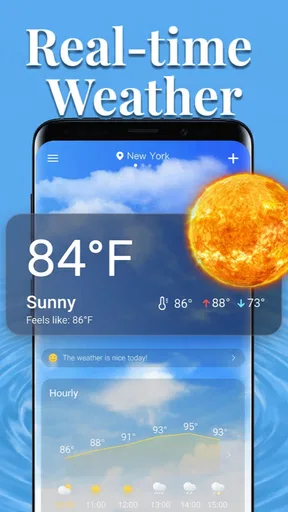
First things first, the app's design is sleek and intuitive. Right from the get-go, you’re greeted with a clear display of the current weather conditions. No need to dig through menus or settings to find out if you need an umbrella or not. Everything is laid out in a way that just makes sense. The user interface is neat, colorful, and engaging, making it a breeze to navigate even if you're not a tech whiz.
Features That Stand Out
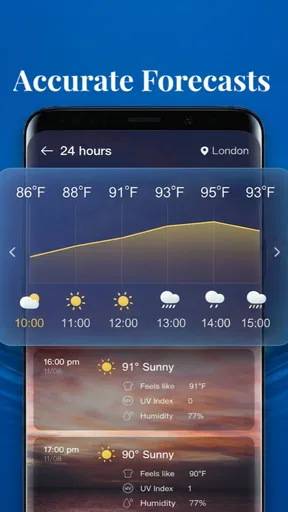
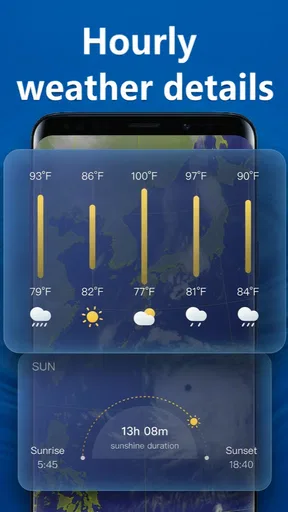
One of the coolest features of Local Weather is its real-time updates. I mean, how many times have you checked the weather, and ten minutes later, it's completely different? This app updates constantly, so you're always in the loop. Plus, it offers detailed forecasts not just for today but for the entire week.
And if you're into specifics, it dives deep with info on humidity, wind speed, and even UV index. It’s like having the news weather segment on your phone, minus the awkward small talk.
Alerts and Notifications
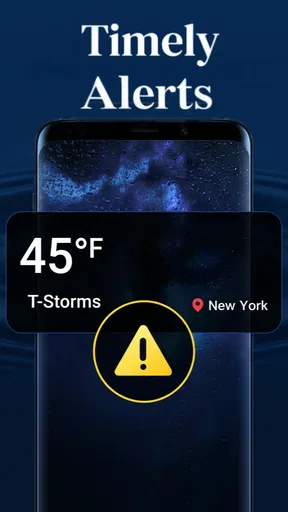
Another lifesaver is the alert system. The app sends out notifications for severe weather conditions, so you’re never caught off guard. Whether it’s a sudden thunderstorm or a heatwave, the app has got your back. The alerts are timely and concise, ensuring you get just the right amount of info without feeling overwhelmed.
Customization and Personalization
What I love is that the app allows some degree of personalization. You can set your preferred units of measurement (Celsius or Fahrenheit), choose your location manually, or let the app do it automatically. It's great for those of us who travel often and need to adjust quickly to new climates.
Not to mention, the themed options let you switch up the app's appearance to match your vibe. Whether you want something bright and sunny or dark and moody, there's a theme for you.
Performance and Reliability
One thing I noticed is that Local Weather doesn’t eat up much battery life, which is a huge plus. It runs smoothly without any annoying lags or crashes. Even on days when the weather is all over the place, the app remains steady and reliable.
Also, for those concerned about data usage, this app doesn’t gobble up your data. It’s efficient and considerate, perfect for those with limited data plans.
Wrapping It Up
In the end, Local Weather is more than just a weather app; it's a trusty companion that helps you plan your day. Whether you're planning a picnic, a run, or just trying to decide if you need a jacket, this app has got you covered. It’s practical, easy to use, and genuinely helpful.
So, next time you're unsure about the weather, don't just look out the window. Grab your phone, open the app, and make informed decisions. Trust me, you won’t regret it.
Pros
- Accurate and timely weather updates.
- User-friendly interface with easy navigation.
- Customizable alerts for severe weather.
- Detailed forecasts for multiple locations.
- Supports multiple languages.
Cons
- Some features require in-app purchases.
- Occasional ads can be intrusive.
- Limited offline functionality.
- High battery usage in background mode.
- Requires constant internet connection.
FAQs for Local Weather: Forecast&Alerts
What features does Local Weather: Forecast & Alerts offer?
Local Weather: Forecast & Alerts provides real-time weather updates, including temperature, humidity, and wind speed. Users can access daily and hourly forecasts, severe weather alerts, and radar imagery. The app also includes customizable widgets and notifications to keep you informed about weather changes at your location.
Is Local Weather: Forecast & Alerts free to use?
Yes, Local Weather: Forecast & Alerts is free to download and use. However, it may offer in-app purchases or a premium version that provides additional features such as ad-free experience, advanced radar options, and extended forecast data. Always check the app store for details on any costs involved.
How accurate is the weather information provided by the app?
The app sources its data from reliable weather services and uses advanced algorithms to provide accurate forecasts. While no weather app can guarantee 100% accuracy, Local Weather: Forecast & Alerts is known for its precision and timely updates, making it a trusted choice for many users worldwide.
Does the app support multiple locations for weather updates?
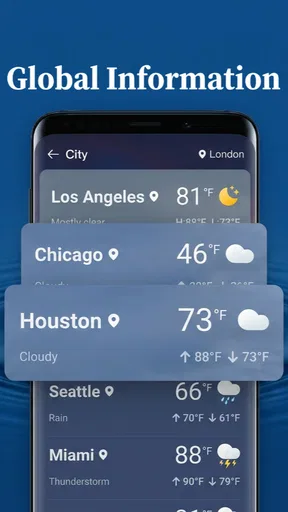
Yes, Local Weather: Forecast & Alerts allows you to track weather conditions in multiple locations. You can easily add and switch between cities to view their current weather and forecasts. This feature is particularly useful for frequent travelers or those who need to keep an eye on different locations.
Is the app compatible with both Android and iOS devices?
Local Weather: Forecast & Alerts is available for both Android and iOS platforms. It is designed to work seamlessly across a range of devices, ensuring that users have access to their local weather information regardless of their smartphone or tablet preference. Check the app store for compatibility with your device.


